 Paperlatch
Read confirmation and policy acknowledgement for Confluence
Know who acknowledged each policy version, and who still needs chasing.
Confirm & Chase puts a confirmation button on any Confluence page. A reader clicks it once, and the confirmation is stored with a timestamp against the exact version of the policy that was in force at that moment.
Confirm & Chase is being published to the Atlassian Marketplace. The install link will appear here as soon as the listing is approved.
What people use it for
The same mechanism, four jobs that come up again and again:
- Policy acknowledgement. An acceptable use policy, a code of conduct or a security policy goes out, and you need to show who accepted which version.
- SOPs in a regulated environment. A standard operating procedure changes, and the people it applies to have to read and confirm the new revision — with the earlier round still on record, because that is what an auditor asks for.
- Required reading for new starters. An employee handbook or an onboarding page that each new person has to work through, with a list of who has not.
- Mandatory reading before a deadline. A change that everyone affected has to see by a date, where the useful output is the list of people who still have not.
- Training acknowledgement. Material someone has to confirm they have "read and understood" — recorded against the version that was current at the time.
Questions it answers
- Who has read the current version of this policy, and who has not?
- Who confirmed an older version and now has to sign off again?
- What did this person actually acknowledge, and when?
- Can I hand an auditor a file rather than a screenshot?
It records a click with a timestamp against a specific version. It does not claim to prove that someone read the page or understood it, and neither should you — what it gives you is a dated, versioned attestation record that did not exist before.
One dashboard, not one per space
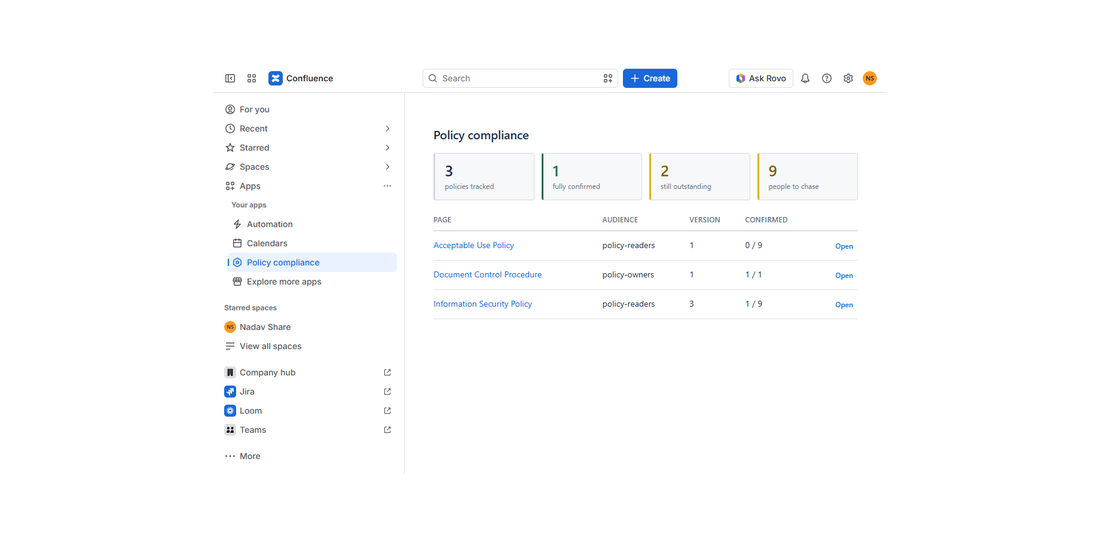
Confluence puts policies wherever they happen to live. Compliance does not work that way. A Policy compliance page in the Apps menu covers the whole site at once: how many policies are fully confirmed, how many are still outstanding, and how many people you have to chase.
The list you actually act on
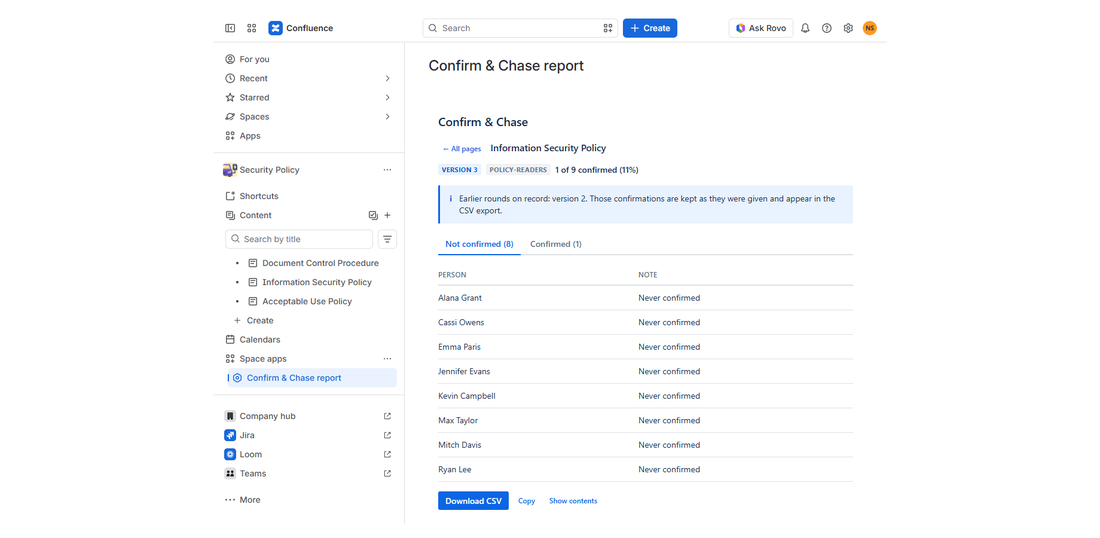
Pick a Confluence group as the audience for a page. The report then shows two lists: who confirmed, and who has not. Service accounts belonging to installed apps are left out of the count, so the list is made of people rather than bots.
When the policy changes
Raise the policy version with one click and every reader is asked again. The earlier round is not deleted and not overwritten. It stays on record exactly as it was given, so six months later you can still show who accepted version 1.
Download CSV produces the full history: every person, every version, every timestamp, including the rounds that are no longer current.
A typo is not a new policy
Editing a page does not reset anybody's confirmation. Most edits are a typo or a broken link, and asking two hundred people to confirm again because of a comma is how a compliance process stops being taken seriously. The document owner decides when a change is material, and starts a new confirmation round deliberately.
Built to be easy for a security team to approve
- Runs on Atlassian Forge, inside Atlassian
- No application server of ours, and no external storage of your page content
- Five read-only permissions, plus storage for the confirmations themselves — the only thing it ever writes — and Atlassian's personal data reporting
- No permission to write to your Confluence content, no acting on a user's behalf, never reads or stores email addresses
- No advertising or behavioural analytics inside the app
You can check the permissions yourself on the Permissions tab of the Marketplace listing rather than take our word for it. The Privacy Policy lists exactly what is stored.
What it does not do
It records that a person clicked a confirmation button at a given time. It does not verify that they read the page, understood it, or agreed to it.
It does not send reminders. There are no deadlines and no reminder emails. The report tells you who is outstanding; chasing them is done however your organisation already does it. If automated reminders are a requirement, this is not the right app for you, and it is better to know that now.
Setting up
- Add the Confirm & Chase macro to a policy page.
- Open its settings and pick the group that has to confirm.
- Publish. The dashboard is under Apps; the per-space view is in the space sidebar.
There is nothing else to configure.
Guides
- How to add read confirmation to Confluence pages
- Policy attestation for ISO 27001 and SOC 2: what auditors look for
- Employee policy acknowledgement: a template, and how to track it
- Can you see who viewed a Confluence page?
- A Confluence onboarding template, and how to know new hires read the policies